



Once payment has been made and the artwork is approved, your order will enter the production stage. Before reaching this stage, you have the option to cancel your order in your account at any time. Custom print orders that have been approved and are in production or have been dispatched cannot be cancelled or returned, since they were made according to your unique specifications.
How can I cancel my order?
- Go to the "Orders" page in "My Account."
Click on the "Order Information" button for the relevant order you want to cancel.

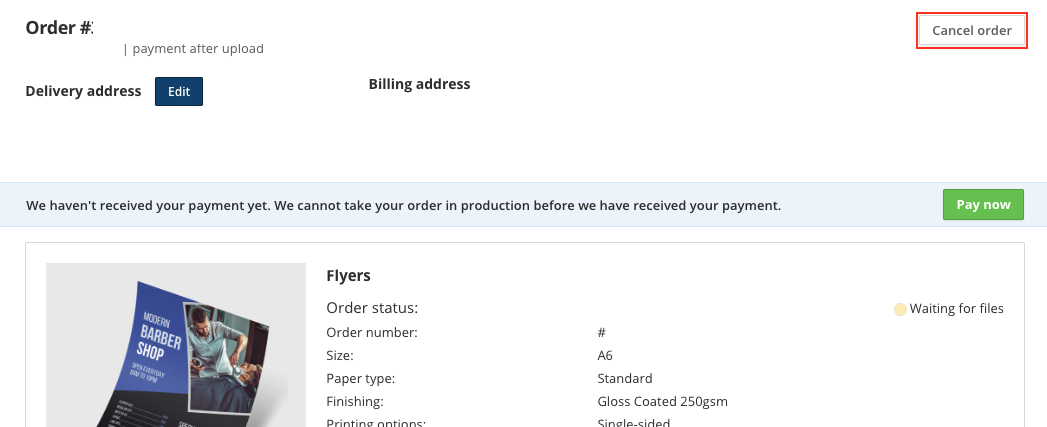
When you have the order details, click on the "Cancel Order" button.
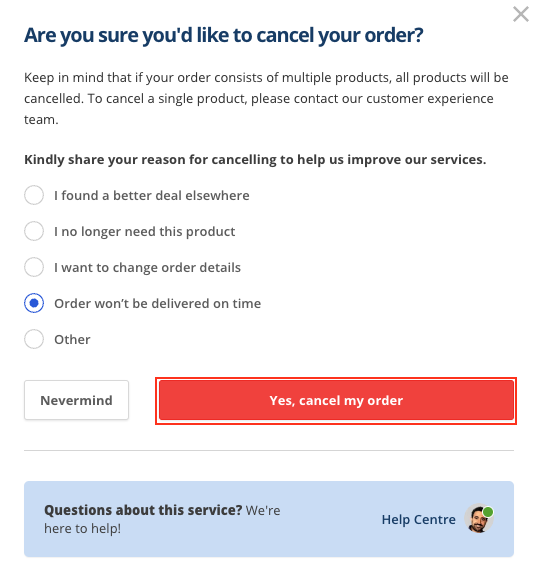
- Select one of the cancellation reasons from the menu.
Click "Yes, Cancel my Order."
- You did it! By following these steps, you have successfully cancelled your order.
To ensure that everything has been processed correctly, you will receive a confirmation email from us. You can also keep an eye on the "Orders" page to see if the status of your order has been successfully changed to "Cancelled."
What should I do if I want to cancel specific products, not my entire order?
If you need to cancel a specific product from your order instead of the entire order, please get in touch with one of our print experts for assistance. As long as the product has not yet entered the production stage, it is still possible to cancel it.
